Nimbus Fire Alarm Management Systems2026-10-21T09:05:13+00:00

NIMBUS FIRE ALARM MANAGEMENT SYSTEMS

Installation of Nimbus Fire Alarm Management Systems

Nimbus Fire Alarm Management Systems

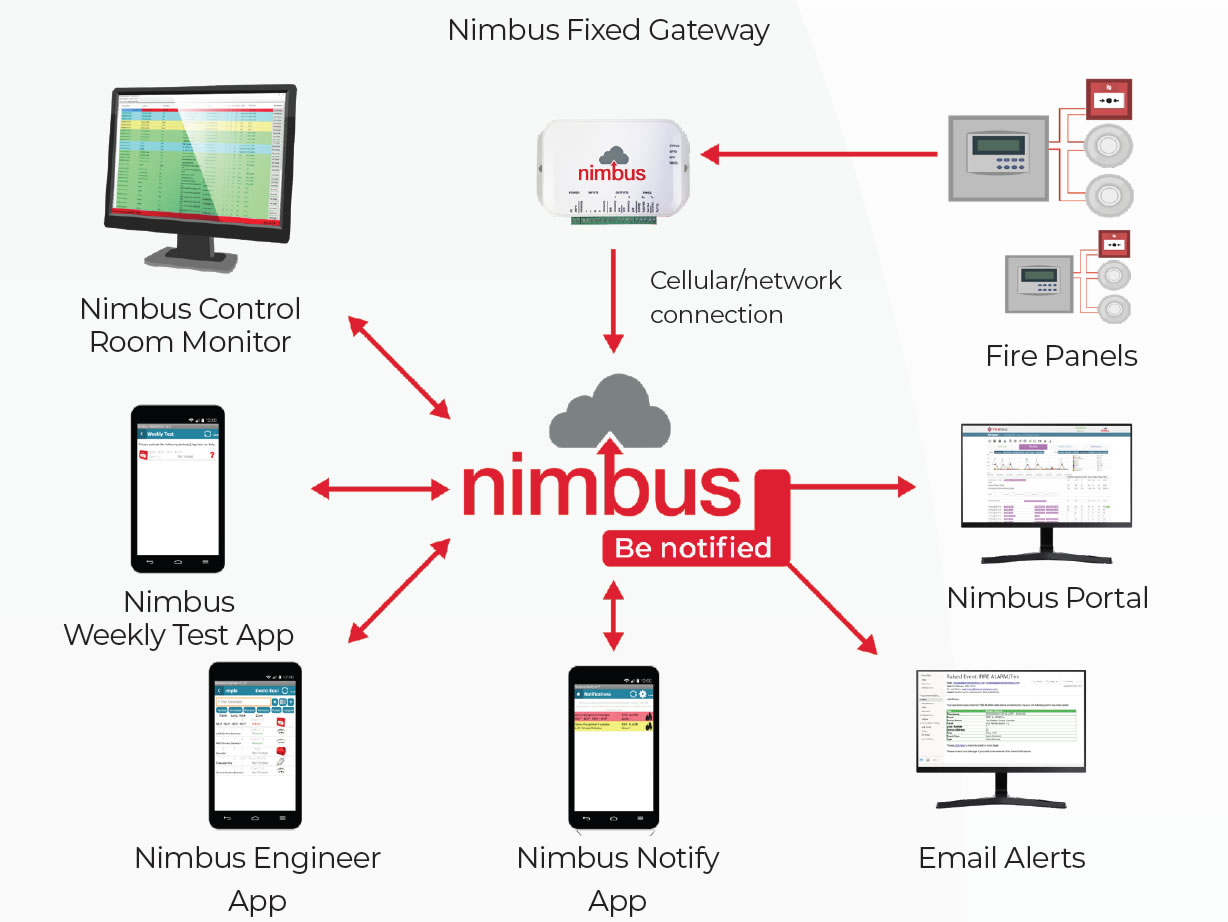
Nimbus has helped a large number of our clients to provide greater control and awareness, and a more modern approach to Fire Alarm Management. The Nimbus cloud-based remote fire alarm management solution offers visibility of your entire portfolio of fire systems, anywhere, anytime. Access is provided via mobile app or web browser, regardless of fire panel type or manufacturer.

The Nimbus gateway is a simple and quick add-on to any fire panel and connects via an existing internet service or the on-board mobile network service. Making it a great choice for all of our clients throughout the UK, whether they be remote properties, single occupied sites, or multi-site national client

Benefits of Nimbus include:

• Access Data from anywhere

• Connects to multiple fire alarm control panels

• Instant event notifications

• Reduce wasted time and money from unconfirmed fire events

• Stay compliant with automated testing and service notifications

• Improve efficiency with automated service reports

• Automatic capture of testing

• Providing unequivocal proof that your service provider testing 100% of your system within the year

In addition to the benefits of keeping you up to date with maintenance and testing schedules for compliance legislation, Nimbus also works seamlessly with your monitoring services, giving the control centre detailed information, allowing them to make the best call to action in the event of a potential fire risk.
Enquiry


As a central source of information Nimbus helps reduce paperwork, delays, and inaccuracies, with historical and real-time data available instantly. All available with multiple criteria search features, making it easy to obtain the information you require. Nimbus is an innovative fire alarm management system providing control and monitoring wherever you are. A non-intrusive add-on to a fire alarm control panel. Nimbus communicates all activity to a cloud-hosted database. Activity is recorded to an infinite log. Users access Nimbus through any desktop or mobile internet connection.

• Generate reports – Reports can be generated to match the search criteria such as date, time, site, panel, loop, device and event.

• Record weekly test – Weekly tests are recorded to a purpose log for compliance reporting. Service testing is recorded to a purpose log for compliance reporting.

• Receive event notifications – Receive notifications of fire, fault, isolation, etc. by email, mobile phone application and secure IP networking. Notifications include the device location and description details as programmed within the fire alarm control panel/s.

• Record additional data to device activity – Mobile phone applications allow service and test data to be centrally recorded. Engineering performance is improved by the use of mobile phone interaction.

• Connects to most UK Fire Alarm control panels – Nimbus is compatible with most UK analogue addressable fire alarm control panels and presents the system status and data in a simple to use common format.

• Independent evidence of testing – Nimbus records the actual fire alarm control panel activity, recording specific details of individual device status and identity information.

If you would like to know more about how the Nimbus system works and integrates with your current site protection, please contact our team on 03300 417 170 or email us at sales@sssystems.co.uk
Nimbus fire safety management platform banner highlighting fire safety compliance, real-time insights and enhanced control for building owners and managers.

Frequently Asked Questions About Nimbus Fire Alarm Management Systems

Nimbus is a cloud-based fire alarm management platform that helps businesses monitor fire alarm activity, manage testing records and review system information remotely.

The platform connects compatible fire alarm control panels to a central online dashboard through a Nimbus gateway.

Authorised users can access relevant information through a web browser or mobile application, making it easier to manage fire alarm systems across one or several buildings.

SS Systems offers Nimbus fire alarm management solutions to help commercial customers improve visibility of their fire safety systems.

Nimbus uses a compatible gateway to collect information from an existing fire alarm control panel and communicate with its cloud-based management platform.

Depending on the fire alarm panel and gateway configuration, the connection can provide access to alarm events, faults, isolations and testing information.

The gateway typically connects through an appropriate internet or mobile network service.

Before installation, SS Systems can assess the existing fire alarm equipment and discuss the connection method, network requirements and information that Nimbus can retrieve.

Nimbus supports fire alarm management, but it does not replace the building’s primary fire detection and alarm equipment.

Nimbus supports a wide range of fire alarm control panels, including many analogue addressable systems from manufacturers commonly used in the UK.

Compatibility depends on the panel model, available communication interfaces, firmware and the information the system can provide.

Some older or specialist panels may offer limited integration options or require additional assessment.

Before recommending installation, SS Systems can review your existing fire alarm equipment and help confirm whether Nimbus offers a suitable connection method.

Do not assume that every panel provides the same level of event reporting or device information.

Nimbus helps businesses manage fire alarm information more efficiently by bringing system activity and relevant records into one online platform.

Potential benefits include:

  • Remote visibility – View relevant fire alarm events and system information without visiting every site.
  • Event notifications – Receive alerts about supported alarm, fault and isolation events.
  • Digital records – Review captured testing activity and maintenance information.
  • Multi-site management – Monitor several compatible fire alarm installations through one platform.
  • Reporting – Search historical activity and generate reports for management reviews.
  • Fault awareness – Identify reported issues earlier and coordinate appropriate action.

The available features depend on the connected equipment, platform configuration and services selected.

Nimbus can support better fire alarm management, but it does not automatically guarantee compliance or eliminate the need for on-site inspections.

Nimbus can provide notifications about different fire alarm events, depending on the information available from the connected control panel.

These may include:

  • Fire alarm activations
  • System faults and warning conditions
  • Detector or zone isolations
  • Device disablements
  • Testing activity
  • Other supported panel status changes

Notifications may include the site, panel, event type and relevant device location details where the fire alarm system supplies that information.

Authorised users can receive suitable alerts through supported mobile applications, email or other configured services.

Agree who should receive each notification and what action they should take when an alert arrives.

Yes. Nimbus can capture relevant fire alarm panel activity during weekly tests and help businesses maintain a digital record of testing events.

Depending on the connected equipment and selected features, the platform can record information such as the test date, time, site and relevant device details.

These records can help building managers and maintenance teams review testing activity and identify missing or inconsistent records.

However, Nimbus does not physically carry out the weekly test or confirm every aspect of the required procedure.

Designated staff must still complete suitable testing in accordance with the building’s arrangements and relevant guidance, including BS 5839-1:2025 where applicable.

Keep any additional records that the system cannot capture automatically.

Yes. Nimbus supports both individual buildings and organisations that manage fire alarm systems across multiple locations.

Facilities managers and other authorised users can view information from compatible connected systems through a central platform.

This can help organisations:

  • Review fire alarm activity across different premises
  • Identify reported faults and isolations
  • Monitor weekly testing activity
  • Access relevant historical records
  • Compare system information between sites
  • Coordinate maintenance and follow-up actions

The platform can also support organisations that add more properties over time, subject to equipment compatibility and the appropriate service arrangements.

SS Systems can discuss Nimbus requirements for single-site businesses and larger commercial property portfolios.

No. Nimbus provides digital monitoring and management information, but it does not replace competent fire alarm inspection, testing or maintenance.

For typical non-domestic fire alarm systems, BS 5839-1:2025 recommends periodic inspection and servicing by a competent person at intervals not exceeding six months.

Engineers still need to inspect equipment, test relevant devices, assess faults and complete the maintenance activities appropriate to the installation.

Nimbus can support this work by providing historical event information, digital testing records and visibility of reported system conditions.

Building managers must continue to arrange suitable servicing and act on identified faults, regardless of whether they use remote management software.

No. Installing Nimbus does not automatically mean that the fire and rescue service will receive a notification whenever your fire alarm activates.

Nimbus can provide event notifications and share relevant information through compatible monitoring arrangements, depending on the services and configuration in place.

However, fire alarm management software and a professionally monitored fire alarm connection serve different purposes.

If your premises require alarm receiving centre monitoring, discuss the appropriate signalling equipment, monitoring agreement and emergency response procedures with SS Systems.

Never assume that a Nimbus notification automatically triggers an emergency services response.

Contact SS Systems to discuss Nimbus fire alarm management for your commercial premises.

Our team can review your existing fire alarm panel, the number of sites you manage and the monitoring or reporting features you need.

We can then discuss gateway compatibility, connectivity requirements and suitable installation arrangements.

Before proceeding, confirm the scope of the installation, any ongoing platform subscription and the support arrangements relevant to your chosen solution.

Call 03300 417 170, email sales@sssystems.co.uk or visit our Contact Us page.

Advice When Choosing and Using Nimbus Fire Alarm Management Systems

Before introducing Nimbus, decide what you want to improve about your existing fire alarm management arrangements.

Some businesses need better visibility of a single building, while others want to coordinate fire alarm activity across a large property portfolio.

Consider:

  • How many fire alarm systems and sites you manage
  • Who currently checks alarm and fault information
  • How staff record weekly fire alarm tests
  • How you manage maintenance reports and outstanding faults
  • Whether relevant staff need remote access to system information
  • Which notifications would help your team respond more effectively
  • What reporting information you need for internal reviews and audits

Use these requirements to establish which Nimbus features would provide practical benefits for your organisation.

SS Systems can discuss your existing fire alarm arrangements and help you assess the suitability of Nimbus.

Check that Nimbus can communicate with your existing fire alarm equipment before approving an installation.

Although Nimbus supports many UK fire alarm panels, the available features and connection methods depend on the specific equipment.

Ask your provider to confirm:

  • Panel compatibility – Whether Nimbus supports your manufacturer and model.
  • Communication interfaces – How the gateway will connect to the existing panel.
  • Event information – Which alarm, fault, isolation and device details the system can retrieve.
  • Gateway requirements – Which hardware and installation arrangements your site needs.
  • System limitations – Whether any existing equipment restricts the available features.
  • Future changes – How a fire alarm panel upgrade could affect the connection.

Ask SS Systems to assess compatibility before committing to the installation.

Do not assume that a compatible panel automatically supports every Nimbus feature.

Nimbus relies on a suitable communications connection to transfer information from your fire alarm equipment to its cloud platform.

Review the available connectivity options before installing the gateway.

Consider:

  • Internet access – Check whether the site can provide a suitable network connection.
  • Mobile coverage – Assess signal availability if the installation will use mobile network connectivity.
  • Network security – Agree any relevant IT requirements with your organisation’s technical team.
  • Gateway location – Choose a suitable position that supports installation and maintenance.
  • Connection failures – Establish how staff will identify and respond to communication problems.
  • Remote access – Confirm that authorised users can access the required information.

A loss of connectivity may interrupt remote updates or notifications even when the underlying fire alarm system continues to operate.

Maintain suitable on-site fire alarm procedures and do not rely exclusively on cloud notifications.

Decide who should receive Nimbus notifications and what action each type of alert requires.

Without clear responsibilities, staff may overlook important events or receive more notifications than they can manage effectively.

When configuring alerts, consider:

  • Fire alarms – Identify the people who need immediate information and the emergency procedures they must follow.
  • System faults – Assign responsibility for investigating and reporting technical problems.
  • Isolations – Make sure relevant staff know when parts of a fire alarm system cannot provide their intended protection.
  • Testing events – Distinguish planned testing activity from unexpected system events.
  • Out-of-hours alerts – Establish appropriate arrangements when normal site staff are unavailable.
  • Escalation – Decide what happens when the first person does not acknowledge or resolve an issue.

Review notification settings regularly as staff roles, building occupancy and operational requirements change.

Remember that Nimbus notifications do not automatically replace a dedicated alarm receiving centre service.

Use Nimbus to improve the accuracy and accessibility of your fire alarm management records.

The platform can capture relevant panel events and support digital reporting, helping building managers reduce manual administration.

Consider using Nimbus records to:

  • Review weekly fire alarm testing activity
  • Identify outstanding faults and isolations
  • Check historical alarm events
  • Support maintenance planning
  • Investigate repeated unwanted alarms
  • Prepare information for internal reviews and audits
  • Monitor relevant activity across multiple buildings

BS 5839-1:2025 provides recommendations for managing and maintaining fire alarm systems in non-domestic premises.

Digital records can support your responsibilities, but the building’s management team must still ensure that staff complete the necessary tests, inspections and corrective actions.

Check that your record-keeping arrangements capture any information that Nimbus does not collect automatically.

Make Nimbus part of your wider fire alarm maintenance programme rather than treating it as a replacement for engineering visits.

Remote information can help maintenance teams understand reported faults and review historical activity before attending site.

Discuss how your provider will use Nimbus to support:

  • Fault investigation – Review relevant events and identify possible causes.
  • Service planning – Use available records to prepare for maintenance visits.
  • Testing records – Compare recorded panel activity with the work engineers complete.
  • Outstanding issues – Track faults that require repairs or further investigation.
  • System changes – Review how alterations affect monitoring and reporting.
  • Maintenance documentation – Keep appropriate engineering reports alongside digital system information.

Continue to arrange competent servicing at the intervals appropriate to your fire alarm installation.

Ask SS Systems how Nimbus could complement your existing fire alarm maintenance arrangements.

Control who can access Nimbus and what information each person needs to perform their role.

Fire alarm event records may contain building locations, device descriptions and operational information, so organisations should manage access carefully.

Establish procedures for:

  • User accounts – Provide individual access where the platform supports it.
  • Permissions – Limit access according to staff responsibilities.
  • Account security – Follow the platform’s recommended authentication and password practices.
  • Staff changes – Review or remove access when employees change roles or leave.
  • Contractor access – Agree what external maintenance providers need to view.
  • Information management – Confirm the relevant data retention, export and access arrangements.

Ask your provider to explain the security features available through your chosen Nimbus service.

Review user permissions periodically, especially when several departments or sites share the platform.

Consider the complete cost of introducing Nimbus rather than focusing only on the initial gateway installation.

The appropriate arrangement depends on your existing fire alarm equipment, the number of connected sites and the services you select.

Before accepting a proposal, ask about:

  • Gateway hardware and installation costs
  • Any ongoing software subscription
  • Internet or mobile network connectivity charges
  • The features included in the proposed service
  • Additional user accounts or site connections
  • Technical support and fault reporting arrangements
  • Future upgrades or changes to existing fire alarm panels
  • Any contract terms or cancellation requirements

Compare these costs with the potential administrative and operational benefits for your organisation.

Nimbus may help reduce unnecessary site visits and improve maintenance coordination, but the savings depend on how you use the platform.

Ask SS Systems to explain the proposed installation and ongoing service arrangements clearly.

Choose a provider that understands both Nimbus technology and the fire alarm systems it will monitor.

SS Systems offers Nimbus fire alarm management solutions alongside its wider commercial fire alarm services.

Before proceeding, discuss:

  • Experience with your existing fire alarm panel manufacturer
  • Gateway installation and connectivity requirements
  • Available Nimbus features and system limitations
  • Notification configuration and user access
  • Integration with existing monitoring arrangements
  • Staff guidance and system handover
  • Ongoing technical support
  • Future expansion across additional sites

After installation, review whether Nimbus provides the information your team needs and whether staff respond appropriately to notifications.

Revisit the configuration when you add buildings, replace fire alarm panels or change your management procedures.

Bonus Tip: Schedule a regular Nimbus management review. Check outstanding faults, prolonged isolations, weekly testing activity and repeated unwanted alarms across your connected sites. Assign responsibility for each follow-up action and record when your team resolves it. This turns the platform’s information into practical improvements in fire alarm management.
Fire Safety Experts Agree Urgent Action Needed To Prevent E-Bike Fires

By |November 18th, 2024|Categories: News|Tags: , , , , , |

E-bike fires are becoming increasingly common, prompting urgent calls for action to prevent more tragedies. Concerns range from the dangers of conversion kits to devastating incidents, with fire safety authorities pushing for stricter regulations and enhanced safety standards to protect lives. Here’s a look at efforts to address this growing risk.
Councils Consider Cutting Back On CCTV Monitoring

By |November 12th, 2024|Categories: News|Tags: , , , , , |

Plans to reduce CCTV monitoring in Shrewsbury are expected to gain approval from Shropshire Council's cabinet. Under these new measures, cameras in the town centre would remain operational, but 24/7 monitoring would be discontinued. This move is part of efforts to address a £62.5 million shortfall in the current financial year's council budget.
Pressurised Fire Extinguisher Handling Guidance Issued

By |November 4th, 2024|Categories: News|Tags: , , , , , |

The Fire Industry Association (FIA) has updated its guidance note to improve the safety and efficiency of handling pressurised container assemblies used in fixed firefighting systems. This revised guidance reflects the latest industry best practices and is aimed at professionals involved in the transportation, installation, maintenance, and removal of these essential safety components.

OUR PARTNERS

SS Systems partner with leading UK based manufacturers to ensure that the fire detection and alarm systems we provide are at the forefront of current technology, along with being the most reliable our industry has to offer.

Externally Monitored to Ensure that we meet a High Standard of Service.

As members of the SSAIB (Security Systems and Alarms Inspection Board), We maintain service records and monitor our success. The SSAIB, is a leading certification body for organisations providing security systems and services, fire detection alarm systems, and monitoring services. So, you can be confident that we strive to provide our clients with a reliable and professional level of service.
Go to Top